Many of you who have played on licensed Steam clients and non-Steam Half-Life clients have probably noticed that it's not obvious how to configure some features.
This article explains how to add Russian chat to Half-Life on Steam, how to make the font bigger, how to add configs and more.
Setting up Russian chat in Steam Half-Life
For this we'll need Rofi Dll; download it from our site or from the developer's site http://ngageclan.ucoz.ru
Extract the contents of the archive into the game's Steam folder, for example D:\Games\Steam\steamapps\**Your account**\half-life\valve
The standard anti-cheat won't complain about Rofi Dll, but sometimes it may replace the client.dll library with its own, and the Russian chat will disappear. To prevent this, do the following.
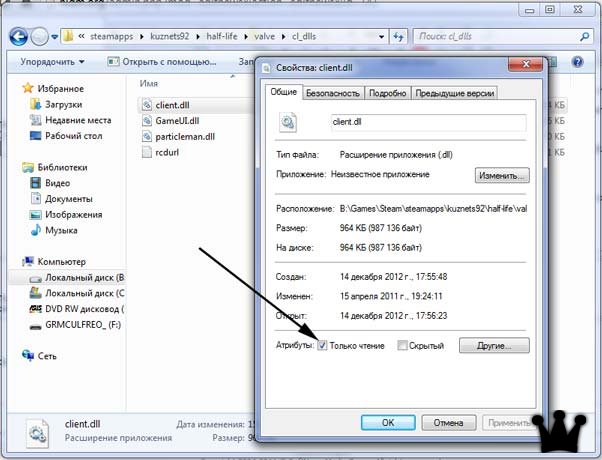
First, set the "Read-only" attribute on the client.dll file.
The client.dll file is located in the following directory: \**Your account**\half-life\valve
For example, in D:\Games\Steam\steamapps\**Your account**\half-life\valve
As shown in the screenshot, tick the box and click "Apply".
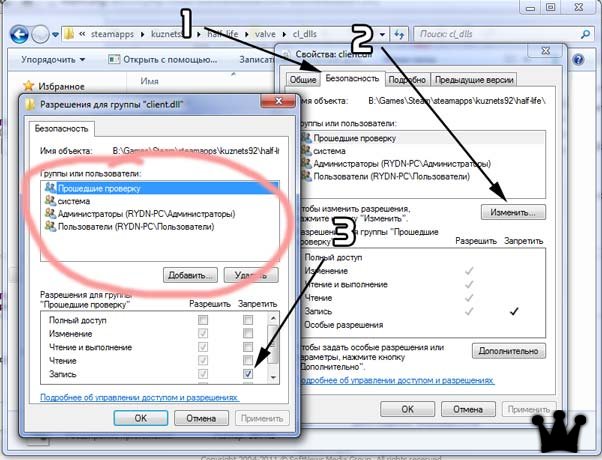
After that, go to the "Security" tab and deny changes to the file; then it can't be deleted, overwritten, edited and so on.
It's best to deny write access for all users. The most important thing here is to tick only the Deny box for Write. Modify, Read and Execute must stay allowed.
That's it. If you did everything right, the Russian chat will stay in your Steam Half-Life for good.
If the "Security" tab is missing, do the following (usually on Windows XP):
In an Explorer window, choose Tools - Folder Options - View tab, find “Use simple file sharing (Recommended)” and untick it.
After that the tab should appear.
Big font
Everyone has noticed that after switching from non-Steam to Steam, Half-Life has a really tiny font that takes a long time to get used to. But the best remedy is to fix it and set a familiar, normal font.
All font settings in Half-Life are stored in the TrackerScheme.res file,
which is located in "*Steam*\steamapps\*Your account*\half-life\"
Download normal fonts for Half-Life on Steam
High Definition Pack for Half-Life
Higher-quality player and weapon models for Half-Life.
Easy to install, easy to remove.
Open your Steam and follow the link you need below.
Other stuff for Half-Life on Steam
I also recommend installing our Half-Life menu: it's in Russian and has quick entries for connecting to our servers.
This article will be updated with new material.