
To port maps, we will need:
Required utilities:
Porting means placing Half-Life items around the map (weapons, spawn points) and removing the other game's items. All the information about the objects on a map is stored in text
form; we just need to export this information to a text file, edit it and import it back into the map.
We will place items around the map in the game itself: it's very convenient to fly around the map and drop weapons in suitable spots. We'll do this with GordonFreeman's AMX plugin, Weapon Factory.
Rename the file liblist.gam, which is in the valve directory, to liblist_backup.gam.
Now download the archive below and copy all of its contents into the valve directory, answering "Yes" to every overwrite prompt.
I'll demonstrate the porting process itself on a Counter-Strike map, fy_kano, made by Burner. I downloaded it from gamebanana.com, where you can also find plenty of interesting maps.
Open the archive; you'll see a cstrike directory in it. Go into it and extract all of its contents into the valve directory, which is in your Half-Life game folder (for example, D:\Games\Steam\steamapps\common\Half-Life). Extract the contents, not the cstrike directory itself.

The first time I launched the map in Half-Life, I got the error "Mod_NumForName: models/winebottle.mdl not found".
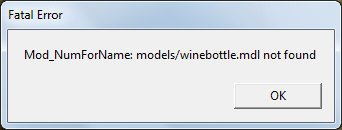
Errors like this appear when a resource in use (a model, sound or sprite) can't be found.
There are two ways to solve this problem. The first is to copy the resources the map uses from Counter-Strike to Half-Life.
The second is to remove or replace the object entries in the ent file; in that case we either remove the object from the map or just change its properties, so the game won't look for it or will load a different file. Be careful with this method and keep the map's specifics in mind, since some objects can be very important. If the map has a helicopter, a tree, a bottle or a person, it may disappear.
Let's go with the second method, since we'll have to export the object data anyway. For this we'll use the RipEnt application.
The archive I provided contains two bat files. Open them, change the map name to yours, save them and run ripent_export.bat

After running it, we get a new ent file named after our map. Open this file and remove the unneeded objects. Each object starts with an opening curly brace "{" and ends with "}"; between the braces are various directives with properties. The "classname" directive is the object's name; we'll only be working with a few of them:
cycler_sprite -- a model or sprite on the map.
env_sprite -- a sprite on the map (fire or some effect).
info_player_deathmatch -- a player spawn point in multiplayer. In Counter-Strike, the terrorist spawn point.
info_player_start -- the player spawn point in single-player. In Counter-Strike, the counter-terrorist spawn point.
game_player_equip -- this object lets you equip the player with the desired weapons.
ambient_generic -- a sound on the map.

On fy_kano I removed all cycler_sprite and game_player_equip entries and kept one info_player_deathmatch and one info_player_start; the rest of the spawns will be placed all over the map. I also moved some standard files from cstrike to valve. After editing the ent file, it has to be imported back; the archive includes ripent_import.bat for that. Import the object properties, drop the map into the valve/maps folder and try launching it in the game.
Once it's running, you'll notice that the various weapons and items are missing.

Now let's use the "Weapon Factory" plugin. Type "wp_spawn" in the console and a menu appears on the left.


Choose which weapon or item to spawn. You can set the rotation angle of the item. Until the map is reloaded, all added items will have a holographic effect.


Besides weapons and ammo, don't forget to place player spawn points. The "Weapon Factory" plugin has no info_player_deathmatch object; well, it does, but it doesn't work. I usually use the crowbar as a spawn point, and later in the entity text file you can change weapon_crowbar to info_player_deathmatch.
Once you've placed all the items and spawn points, reload the map ("restart" in the console) and you'll see that the map is now full of items. But the porting isn't finished yet:
all these items are stored in the "Weapon Factory" plugin's database, and we need to embed them into the map itself.

Now we need to convert the "Weapon Factory" data into data that can be safely imported into the map. Go to the valve\addons\amxmodx\configs\weapon_factory directory; it should contain an ini file named after our map, in my case fy_kano.ini. For the conversion we'll use my EntConverter: copy ent_converter.exe into the directory with the ini files, valve\addons\amxmodx\configs\weapon_factory, and run it. After that an ent file named after our map should appear, in my case fy_kano.ent. Append the entire contents of this file to the ent file we exported with RipEnt.

Don't forget about our workaround: weapon_crowbar needs to be replaced with info_player_deathmatch. In some cases players may spawn inside the ground, so you need to increase the object's z coordinate (height); keep in mind that the numbers can be negative.


After saving the final ent file, import it into the map by running "ripent_import.bat".
The map has been successfully ported from Counter-Strike to Half-Life. You can check whether everything works. Before that, don't forget to delete liblist.gam and rename liblist_backup.gam back to liblist.gam;
this disables AmxModx and the "Weapon Factory" plugin. If you don't, all the items we placed will be duplicated.
You can port absolutely any GoldSource map this way. Besides porting, you can add items to existing Half-Life maps, fix map problems and so on.
6rfdgfdgfvgfcbghb dhgfvbfgchfgc